

JSON Data Matching Tool
JSON Match & Update syncs values from a source dataset into corresponding fields of a target dataset. It matches rows by an ID field shared between the two JSON sources and writes the source value into the target's named field — useful for merging fresh counts, ratings, or any per-row attribute back into a canonical dataset.
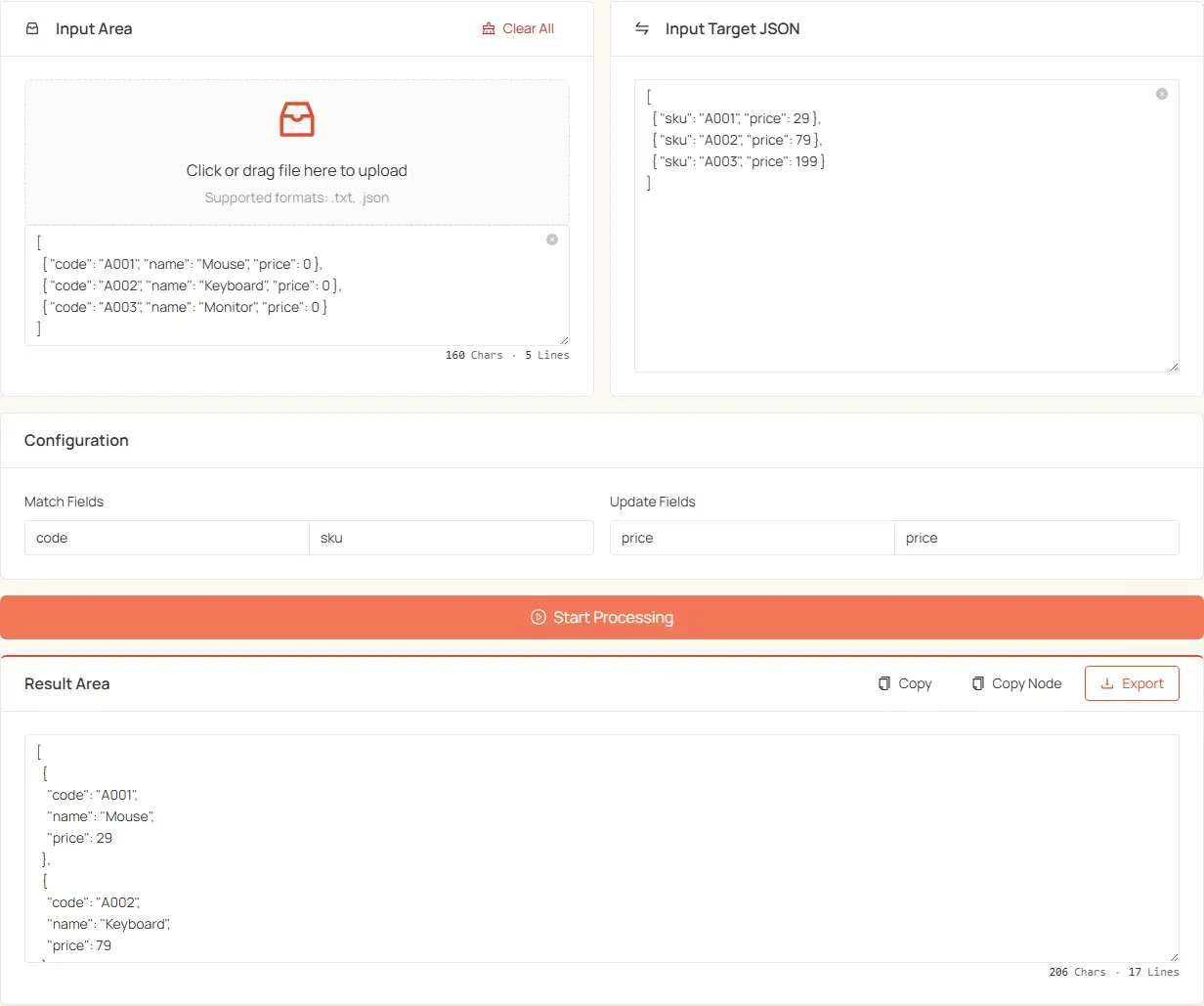
Usage Steps
-
Prepare Your Data:
- Original Data: The complete JSON dataset that needs to be updated
- Target Data: The JSON dataset containing the count values
-
Input Data:
- Paste or upload your original JSON data in the left text box
- Paste your target JSON data (with count values) in the right text box
- You can also drag and drop
.txtor.jsonfiles
-
Configure Matching Fields:
- Match Fields · source: the unique identifier field in your original data (default:
id) - Match Fields · target: the corresponding ID field in your target data (default:
card_id) - Update Fields · source: the field in original data to be updated (default:
weight) - Update Fields · target: the field in target data containing new values (default:
count)
- Match Fields · source: the unique identifier field in your original data (default:
-
Process Data:
- Click the "Start Process" button to execute the data matching and update
-
View Results:
- Updated data will display in the result area below
- Options to copy the complete result, copy only the JSON node content, or download the updated file
Special Rules
- If an item in the original data has a Chinese title (
zh.title) containing "失效" (invalid), its weight will automatically be set to 0 - If no corresponding item is found in the target data for an original data ID, that item remains unchanged
Additional Features
- Large-file friendly: for bigger datasets, upload the file instead of pasting it into the text box
- Reset Upload: Clear uploaded files and text box contents
Data Format Examples
Original data format:
Target data format:
Result data: