

JSON Node Insertion
JSON Node Insertion Tool is an efficient tool for optimizing data structures. It allows you to insert one or more new nodes after a specified node in a JSON document, making the data structure more logical and efficient.
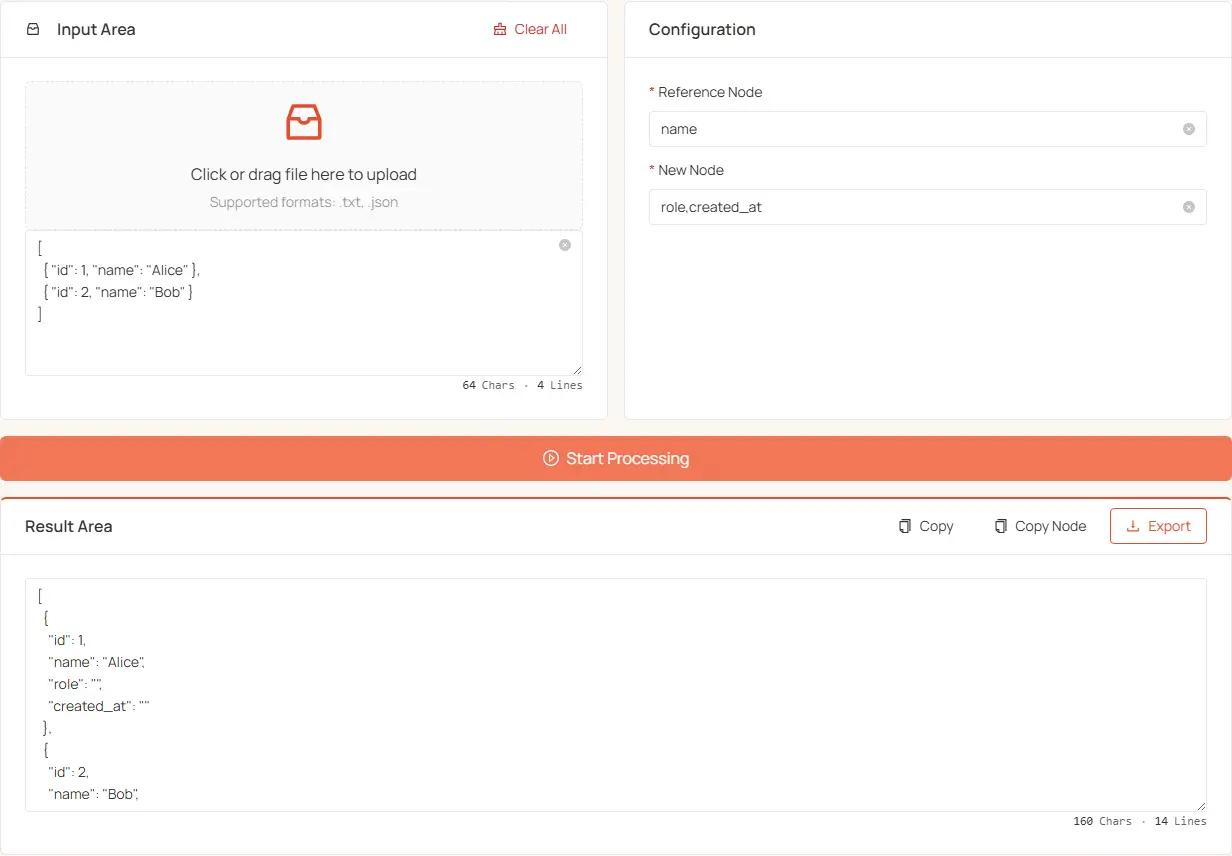
Features
- Precisely insert multiple new nodes after a specified node.
- Support for inserting multiple nodes, separated by commas (supports both English and Chinese commas).
- Batch insertion of nodes to improve data processing efficiency.
How to Use
-
Input JSON Data
- Drag and drop to upload a JSON or text file.
- Or directly paste the JSON content into the text box.
- For large JSON files, upload the file instead of pasting it.
-
Set Insertion Parameters
- Target Node: Enter the node name where you want to insert new nodes (this determines the insertion position).
- New Node: Enter the names of the nodes to be inserted, separated by commas.
-
Processing and Export
- Click the "Start Processing" button to execute the insertion.
- The processed result will be displayed in the text area below.
- You can choose to copy the full result, copy only the node values, or download the processed file.
Usage Tips
- Ensure that the input JSON format is correct; otherwise, it cannot be processed.
- The target node must exist in the JSON; otherwise, an error will be displayed.
- New nodes will be inserted in the order they are entered, immediately after the target node.
- If the node names are purely numeric, they will be automatically sorted by value and placed at the front.
- For large JSON files, upload the file instead of pasting it — the page stays responsive.
Use Cases
- Optimize JSON configuration file structure.
- Adjust API response data format.
- Batch add new attributes to existing data structures.
- Quickly reorder system configuration parameters.