

Brace Expander
Brace Expander is for the case where one rule has to yield nine names or a hundred: a database migration that needs 100 field names, a batch of URLs, renamed files, or the contents of a SQL IN (...). Write the rule once; it lists every combination.
The syntax is bash brace expansion, so the output matches bash line for line — whatever you can verify in a shell, you get the same here.
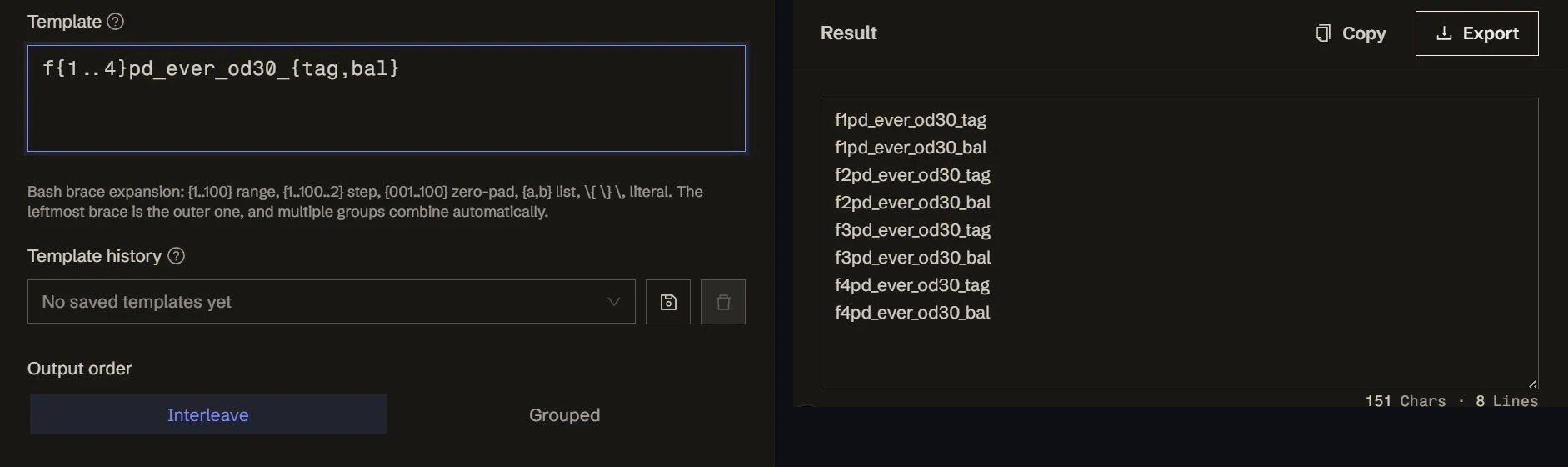
- Write one line in the template box, e.g.
f{1..4}pd_ever_od30_{tag,bal} - All eight names appear live below — click the example in the empty state to fill it in
- Copy or export. To wrap into SQL or JSON, open Advanced settings
Template syntax
One template per line; several lines concatenate in order and each expands on its own. Braces inside a line expand:
Zero-padding takes its width from the literal width of the start value; the end never shrinks it: {001..10} gives 001 … 010. Whether you want f001 or f1 is yours to write in the template.
Several groups combine on their own
Multiple brace groups form a Cartesian product without you writing one:
Output order
Advanced settings holds an output-order switch deciding which brace group runs slowest:
- Interleave (default, matches bash):
{a,b}{1,2}→a1 a2 b1 b2, with the leftmost brace outer.f{1..4}_tag,balgives f1…_tag, f1…_bal, f2…_tag … - Grouped: same template →
a1 b1 a2 b2, with the rightmost brace outer, running all the way through before the left one advances. Use it when you need all the tags before all the bals
Both modes produce exactly the same items; only the arrangement changes.
Several template lines always concatenate in line order — the switch only applies to groups within a single line.
Assembly
The shape is prefix · line ⟨separator⟩ line · suffix:
- Line separator: newline
\nby default;,for SQLIN - Global prefix / suffix: the start and end of the whole result, e.g.
[\nand\n]for a JSON array
Common recipes:
- Field names — template
f{1..100}pd_ever_od30_{tag,bal} - URL list —
https://example.com/{a,b,c}/{1..20} - Filenames —
img_{001..100}.png - SQL
IN (...)— template'{1}', separator,, prefixIN (, suffix) - SQL
INSERT— template('{1}', '{2}'), separator,\n, prefixINSERT INTO t (a, b) VALUES\n, suffix; - JSON array — template
"{1}", separator,\n, prefix[\n, suffix\n]
Template history
Keep the few recipes you reuse in the history and pull them back in one click. The row stays off the first screen while the history is empty — it returns on its own after the first save.
Limits
- The ceiling is 10,000 lines per run, a deliberate departure from bash, which has no limit. Past it, no partial result is produced; the reason is shown so you can narrow the range instead of shipping half a list
- Grouped order is not bash behaviour — see above
- Typos stay literal.
{a},{1..}and{1..3.5}are not valid brace forms, so they come out exactly as written rather than raising an error, which makes a broken template obvious instead of silently short