

Novel Processor
Novel Processor is a one-stop cleanup tool built for web novels, e-books, and other long-form text. It auto-repairs formatting issues, strips ads, normalizes chapter titles, reorders by chapter index, and optionally does Trad/Simp conversion — turning chaotic novel text into something clean and readable.
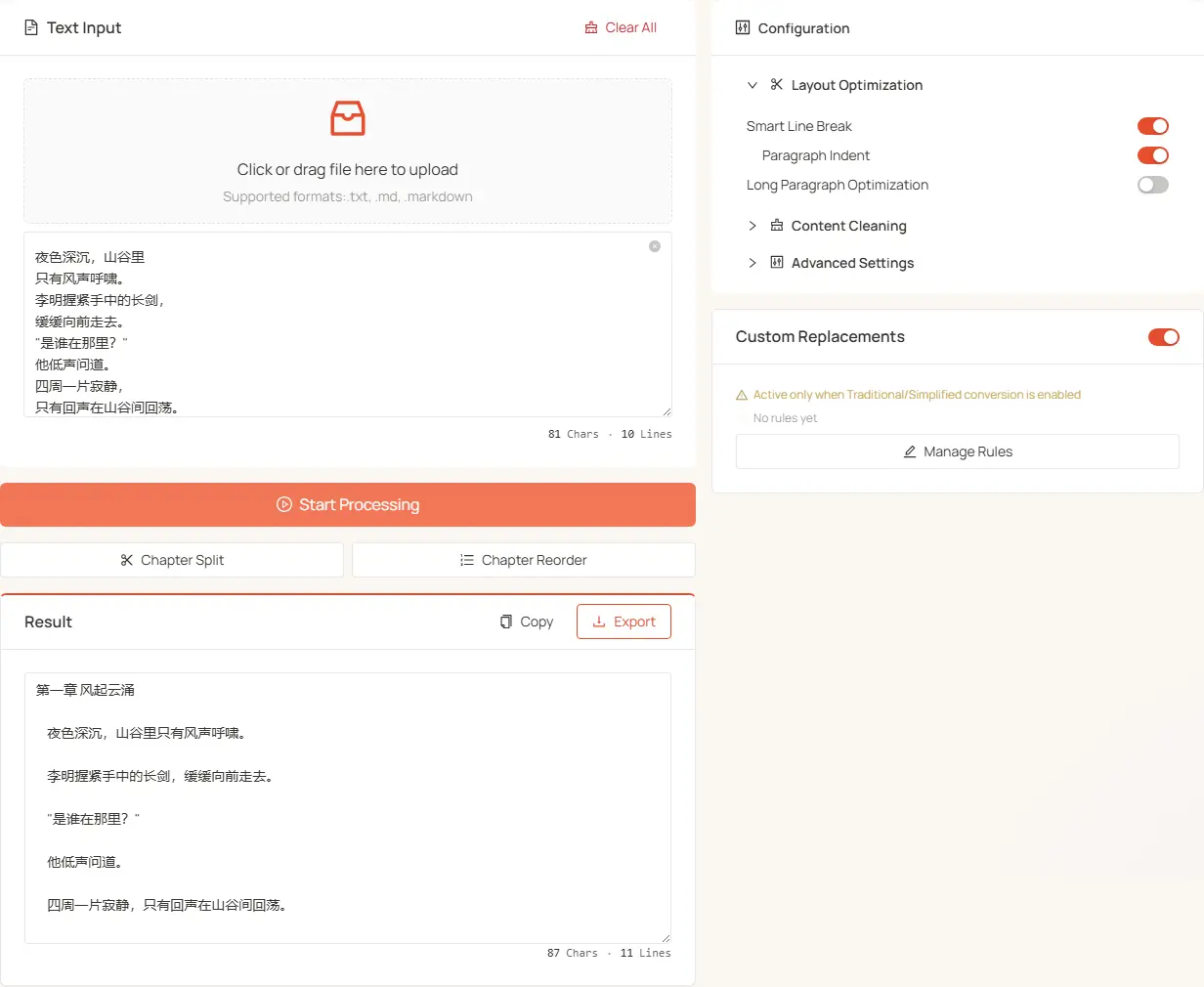
What problems does it solve?
Typical pain points with downloaded novels:
- Messy layout: paragraphs not separated, chapters running together, scattered blank lines
- Ad watermarks: downloader stamps, group-promotion lines, "split-volume reading" markers
- Inconsistent format: mixed Trad/Simp, full-width vs half-width chaos
- Broken line wrapping: sentences split mid-line, paragraphs broken at the wrong spots
- Chapter ordering: scrambled tables of contents, chapter titles without line breaks
Page layout
Two columns:
- Left: file upload + text input + three primary action buttons + result card
- Right: three-section configuration Collapse + Custom Replacement Rules panel
Left column: input & actions
File upload
- Drag-and-drop or click; supports TXT, MD, and other text formats
- Multi-file mode by default — drop an entire novel collection at once
- In Single-File Mode (toggle in Advanced Settings), uploading a new file replaces the current one
Three primary action buttons
When done, the result is auto-copied to clipboard and shown in the result card.
Right column: three-section configuration
1. Typesetting (expanded by default)
- Smart Line Break (on): detect paragraph boundaries via Chinese punctuation, pure-numeric lines, and special starters; re-merge broken sentences
- Sub-toggle Paragraph Indent (visible only when Smart Line Break is on, default on): add
\tto each paragraph head — gives book-style typography
- Sub-toggle Paragraph Indent (visible only when Smart Line Break is on, default on): add
- Paragraph Split (off by default): break long paragraphs into shorter ones via sentence detection (compromise English NLP + Chinese punctuation rules) — better for mobile reading
2. Content Cleaning (collapsed by default)
- Chapter Title Formatting (on): recognize "Chapter X" / "第X章" patterns and normalize them
- Merge Duplicate Chapter Titles: when the same chapter title appears more than once (including back-to-back repeats and near-duplicates differing only in full/half-width punctuation), collapse them into one, keeping the more complete title
- Strip Line-End Digits (off): remove trailing digits only on lines ≥ 10 chars (avoids stripping years from short titles)
- Trim Spaces (on): strip leading/trailing whitespace per line
- Remove Adjacent Duplicates (off): drop only consecutive duplicate lines (not full-text dedup — preserves common short dialogue like "嗯" / "好")
- Special Start Text: enter the novel title or a recurring header word — matching lines are forced into their own paragraph (prevents incorrect merging)
- Content Filter + Protect long lines:
- Content Filter: comma-separated keywords (
channel,downloader) — every matching line gets dropped - Protect long lines: lines longer than N characters are kept even if they match — protects body paragraphs. 0 disables the exemption.
- Content Filter: comma-separated keywords (
3. Advanced Settings (collapsed by default)
- Trad/Simp Conversion Segmented:
- None → skip this step
- Trad → Simp → uses
tw → cn - Simp → Trad → uses
cn → tw
- Single-File Mode: one file at a time
- Auto Export (visible only in single-file mode): skip preview and download directly
Custom Replacement Rules (shared with Chinese Converter)
Bottom-right of the page:
- Master toggle: enable / disable all rules
- Shows current s2t / t2s rule counts
- Manage Rules button: opens the drawer to add/edit/delete rules, plus batch import/export
- Inactive hint: if Trad/Simp conversion is set to "None", the panel shows a "rules currently inactive" hint
The dictionary is shared with the Chinese Converter tool (same localStorage key) — edit in one place, applies in both. Only participates in processing when Trad/Simp conversion is actually enabled in Advanced Settings.
Full pipeline (Start Process button)
The complete pipeline triggered by the main button:
- Trad/Simp conversion (if enabled): applies the appropriate protected rules
- Normalize newlines + strip novel artifacts: unify
\r\n→\n, remove common downloader watermarks /分卷阅读markers / horizontal-rule lines - Full-width → half-width: normalize Latin letters, digits, and punctuation
- Chapter mark formatting: replace colons in
第X章:with spaces, compress redundant spaces around chapter markers - Chapter split (if enabled): break inline-written chapter titles
- Keyword filtering (if filled): drop lines matching keywords (subject to threshold exemption)
- Line-end digit stripping (if enabled): strip trailing digits on long lines
- Paragraph splitting (if enabled): break long paragraphs
- Smart line break / paragraph indent: re-merge broken sentences, add paragraph indent, collapse extra blank lines
Result card
After processing:
- Auto-copied to clipboard
- Copy / Export / Edit in place: same as Chinese Converter
- Result → Source: pipe the result back into the input for further processing (rare)
With "Auto Export" enabled, the preview is skipped and the file downloads immediately.
Tips
First-time use
- Test on a small slice (1-2 chapters) first; tune the config before processing the full book
- Start the Content Filter with 1-2 obvious watermark terms; expand the list after verifying
Power moves
- Protect long lines is the key trick: set it to ~50 (or the average paragraph length) to surgically delete short watermark lines while keeping long body paragraphs
- Run Chapter Reorder standalone: when you only want to fix chapter order, click Chapter Reorder directly — don't run the full Start Process pipeline
- Pre-edit Custom Replacement Rules: for novels with rare Trad/Simp-mixed proper names, add them to the dictionary first, then run Start Process
When it shines
- Format-broken text from pirated novel sites
- Novel collections harvested by scrapers / auto-downloaders
- Long-form text from OCR / PDF copying
- Pre-processing before importing into Kindle / Moon+ Reader / Apple Books
Technical note
For deeply-obfuscated watermarks (scrambled-character promotional content), combine Content Filter with Protect long lines as a first pass. Extremely obfuscated patterns are best handled by the Multi-Function Text Processor with a custom regex, then fed back here for layout.
Runs entirely in your browser — no data is uploaded.