

Text Diff
Text Diff is an offline two-pane text and file comparison tool. Beyond highlighting changes, it states in one sentence which line and which field the first difference starts at — so you don't have to hunt for the starting point in a screen full of red and green.
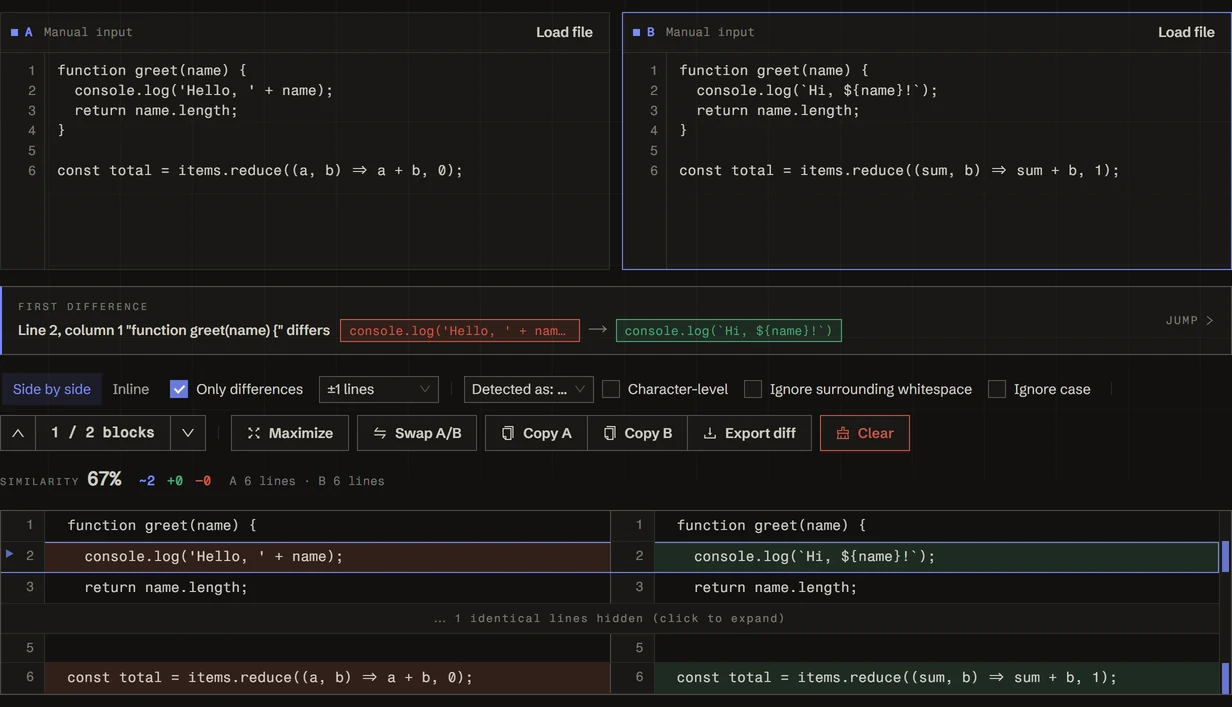
- Paste text into each pane, or drag two files in
- Glance at the detected format (plain / CSV / TSV / INI / JSON) and switch it if wrong
- The banner spells out where the first difference is — click "Jump" to go there
- Need to hand it to someone? "Export diff" gives you a
git apply-ready.patch
First-difference locator
This is what sets the tool apart from a plain diff: the banner describes the first difference in natural language, phrased per format:
Pair it with the Previous / Next buttons to step through blocks; the header also shows "block i of n".
Format detection
Detection combines file extension and content, and can always be overridden:
- Plain text: line-by-line comparison
- CSV / TSV: guesses the delimiter first (whichever of
,\t;|yields the most consistent column count), then compares by column, handling quoted fields and""escapes - INI: compares key/value pairs and names the key whose value changed
- JSON: currently compared as text lines (a notice is shown)
Comparison options
- Ignore surrounding whitespace: skip differences caused by edge spacing
- Ignore case: skip letter-case differences
- Character-level diff: within a modified row, mark exactly which characters changed (off by default)
- Only differences: fold away identical content, keeping just the diff blocks
- Context lines: how many lines to keep around each difference when folding — "Only differences" or ±N lines
Views and navigation
- Split / Unified: switch between the side-by-side and inline views at any time
- Maximize: full-screen mode for long files
- Swap A/B: exchange the two sides in one click
- Expand folds: identical runs collapse to "⋯ N identical lines hidden (click to expand)"
- Stats: similarity percentage, line counts for A and B, and "N differences · X modified / Y added / Z deleted"
Performance guard
When the two sides diverge heavily, a line-level diff can take a long time. A 3-second timeout stops the run and shows "comparison timed out" rather than hanging the page. Click "Compare anyway" to force a full run with no time limit for that comparison. Any content change re-arms the guard.
Encoding detection
Uploaded files are auto-detected as UTF-8, GBK, Big5, UTF-16LE, and other common encodings, with the detected value displayed; a manual switch re-decodes the file. Especially useful for CSVs exported from different systems, GBK config files in legacy projects, and Windows logs.
Export
- Copy A / Copy B: copy either side out
- Export diff: generate a standard unified diff (
.patch) forgit applyor a code review tool. The filename defaults to B's filename
Common patterns
- Verify a config change: drop in two
.ini/.envfiles and read off which key's value moved - Compare tabular data: two exported CSVs, located down to the exact field
- Self-review before a PR: compare local changes against the deployed version and export a
.patch - Proofread a translation: enable "Ignore surrounding whitespace" to see only substantive edits between revisions
Everything runs locally in your browser — nothing is uploaded — safe for sensitive configs and private code.