

Text Joiner
Text Joiner solves the "two lists that need to be merged row by row" problem: names in one column and URLs in another to build Markdown links; a column of IDs to build a SQL IN (...); several columns of tabular data to reassemble into CSV. Row-by-row alignment plus template placeholders — configure once, produce the whole batch.
It is the inverse of Text Splitter, and pairs well with the batch prefix/suffix in Multi-Function Text Processor — that one only adds fixed affixes to a single column, whereas cross-column joining needs this tool.
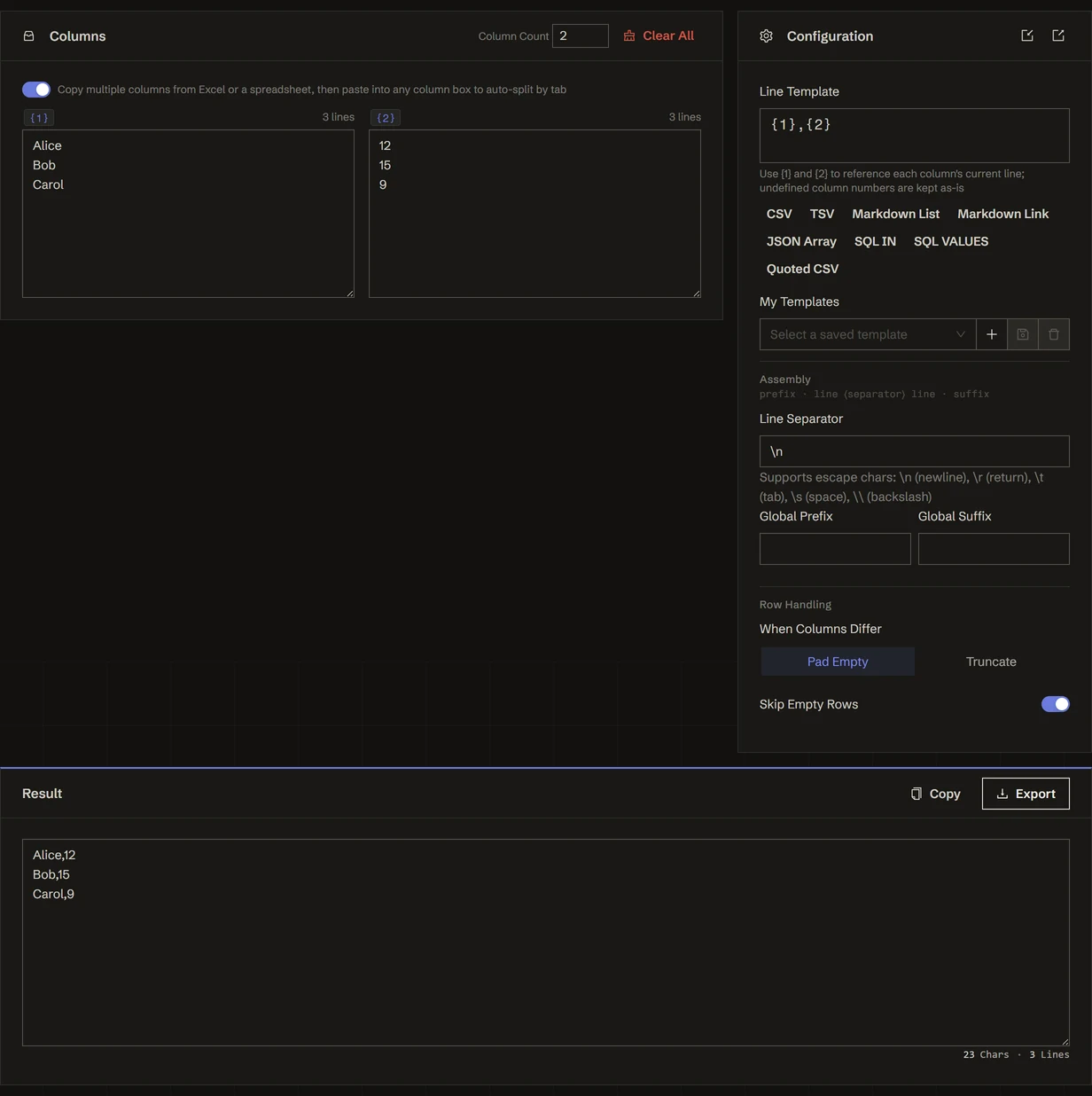
- Fill in the columns on the left: one text per column, one entry per line
- Click a preset (CSV / Markdown link / SQL IN …) or write your own row template like
{1},{2} - The result updates live on the right — copy it
Column input
- Column count: 1 to 8, adjust as needed
- Auto-split on spreadsheet paste: multi-column content copied from Excel or Google Sheets can be pasted into any column box and is split by tabs across the columns ("Split as table: N rows × M columns"). Content beyond the column limit fills the first 8 and reports the overflow. Turn off the "Auto-split spreadsheet paste" switch if you'd rather it didn't
- Row counts: each column header shows its current row count, making mismatches easy to spot
- Load example: one click drops in runnable sample data
Row template
The template decides what each row produces, referencing the current row of each column with {1}, {2}:
Column numbers you haven't defined are left as-is rather than replaced with empty strings. Clicking the {N} chip next to a column header inserts that placeholder at the cursor.
Built-in presets
One click fills in all four settings — template, separator, prefix, suffix:
- CSV / Quoted CSV / TSV: rebuild tabular data
- Markdown list / Markdown link:
- {1} {2}/- [{1}]({2}) - JSON array: one object per row (
{"c1": "…", "c2": "…"}), wrapped in[ ]and joined with, - SQL IN: emits
IN ('a', 'b', 'c') - SQL VALUES: emits a full
INSERT INTO table (col1, col2) VALUES ('…', '…'), …;
Presets are generated from the current column count — set it to 3 and the CSV preset becomes {1},{2},{3}.
Assembly
The structure is prefix · row ⟨separator⟩ row · suffix:
- Line separator: what goes between rows — a newline
\nby default; SQL IN uses, - Overall prefix / suffix: what wraps the entire result, e.g.
[\nand\n]for a JSON array
Separators and affixes accept escapes like \n and \t. The template itself is not escape-parsed, so type a real tab if you need one.
Row handling
- When columns differ in length:
- Pad (default): follow the longest column, filling missing cells with empty strings
- Truncate: follow the shortest column, dropping the extra rows
- Skip fully empty rows (on by default): a row where every column is empty produces no output
My templates
Configurations you've tuned can be saved and reused:
- Save as / Update current / Delete: manage several named configurations
- Export / Import config: a JSON file containing all templates plus the current settings, for moving between machines or sharing with teammates
Recipes
The table below assumes column 1 = Alice / Bob and column 2 = 12 / 15, and lists all four settings for each goal.
Most of these have a one-click preset (CSV / TSV / Markdown list / Markdown link / JSON array / SQL IN / SQL VALUES / Quoted CSV) that fills all four settings for you — tweak from there.
Typical workflows
- Spreadsheet data into a database: copy multiple columns from Excel → paste into any column box (auto-split) → click the SQL VALUES preset → copy out a complete
INSERT - Build a query filter from a list of IDs: paste the IDs into column 1 → click the SQL IN preset → paste straight into
WHERE id IN (...) - Bulk link list for a doc: titles in one column, URLs in the other → Markdown link preset → paste into your Markdown
- Single-column batch formatting: set the column count to 1 with a template like
{1} — done, turning it into a per-line affixer - The inverse of Text Splitter: use Text Splitter to break a long text on separators → process it → join it back by template here
Everything runs locally in your browser — nothing is uploaded.