

Text Splitter
The Text Splitter chunks long text for preparing LLM context (ChatGPT, DeepSeek, Claude), threaded posting, per-sentence translation, and subtitle-script cleanup. It offers four splitting modes — symbol, length, Chinese, English — and the result can be copied back as one merged document or exported one file per segment.
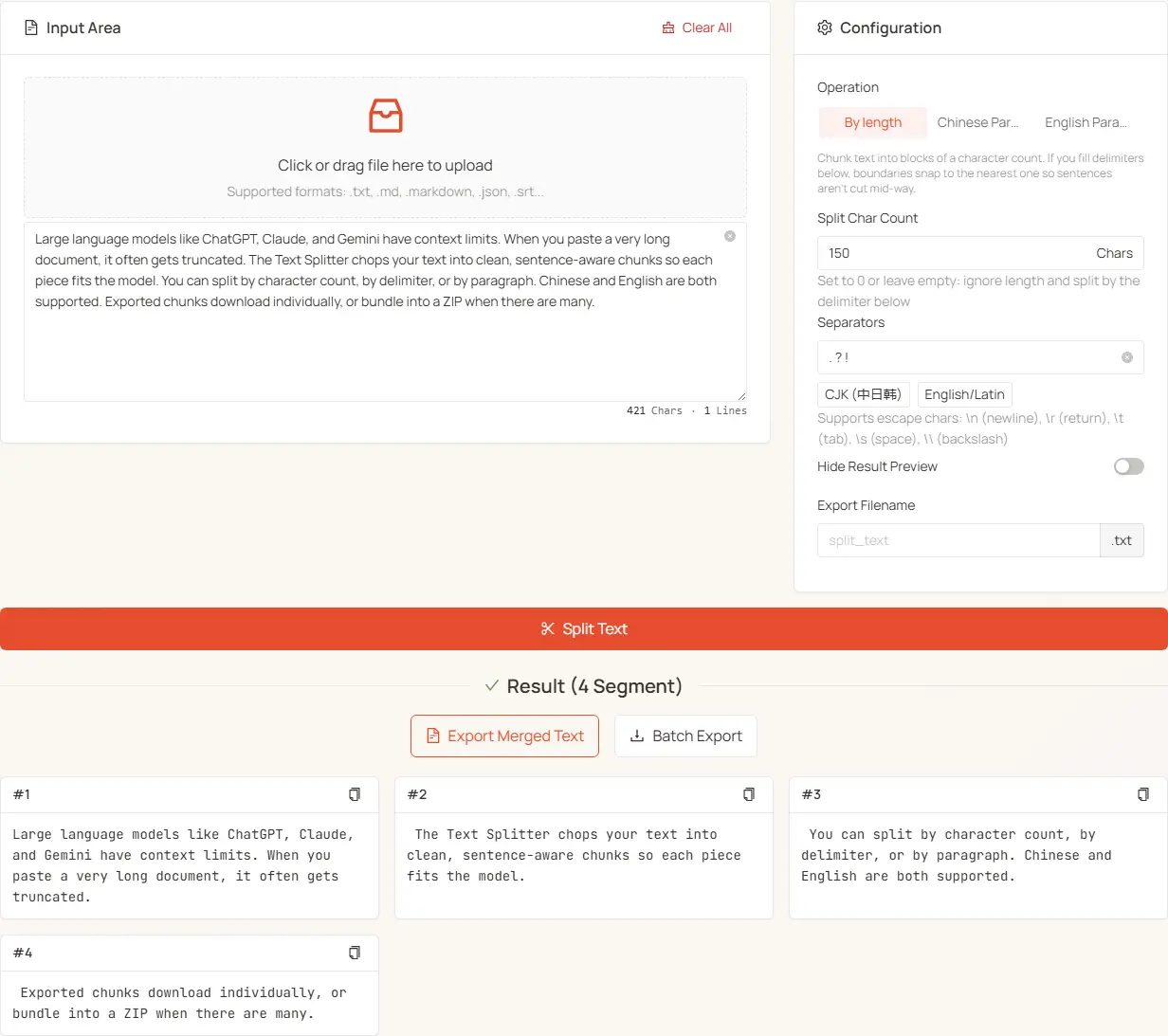
- Paste or upload your long text (upload non-UTF-8 files rather than pasting them)
- Pick a mode:
- Break on punctuation, commas, pipes, … → Symbol (default)
- Fixed-size chunks → Length
- Long Chinese text by sentence → Chinese
- English by sentence → English
- Symbol mode: enter separators + set the granularity with "separators per segment". Length mode: set the character count (empty = 5000)
- Run it, then choose Copy Merged Text / Export Merged Text / Export Segment Files
Four splitting modes
Modes are picked via the Segmented at the top of the Configuration card, labelled "Symbol / Length / Chinese / English" — hover any label for its full description. Each mode only shows its own config, so the panels stay focused.
1. Symbol (default)
Splits on the separators you supply: every match cuts off one unit with the separator kept at its end, then "separators per segment" merges adjacent units into the final segments.
Two parameters
- Separators: where to cut. Separate multiple symbols with a space; any match triggers a split
- Separators per segment: defaults to 1, i.e. break at every separator. Set N to merge N units into one segment. A leftover shorter than N becomes its own segment
Splitting on commas
Take apple,banana,orange,grape,melon,mango with , as the separator:
Sentence punctuation follows the same rule: separators . ? ! with separators-per-segment 3 gives you three sentences per segment.
The default separators follow the UI language
- Chinese / Traditional Chinese / Japanese UI:
。 ? ! - Every other language:
. ? !
The two sets are deliberately kept apart, because a bare ASCII period is frequently not a sentence marker in real text — merged, 3.5 would split into 3. and 5, config.json into config. and json, and tools.newzone.top into three pieces. The CJK and English/Latin preset buttons under the field switch between them in one click.
The separator field accepts
- Any symbols, space-separated for multiple:
, ; |or。 ? ! . ? !for mixed CJK/Latin text - Multi-character separators such as
……or--- - Escape sequences:
\n,\r,\t,\s,\\ - Regex metacharacters taken literally — entering
.splits on periods, not "any character"
Edge behaviour
- Repeated separators (
Hi.. there) fold into the preceding segment rather than producing empty ones - Leading separators accumulate as a prefix for the next segment
- So re-joining the result with the same separator reproduces the original characters
When nothing matches, the tool reports "none of the separators appear in the text" and skips the split. Arabic ؟, the Hindi danda ।, and Thai (no sentence punctuation) fall outside the default sets — enter that language's real punctuation, or switch to a sentence mode.
2. Length
Chunks text into blocks of a given character count. Leaving it empty falls back to 5000 (minimum 1).
5000 is the default because the remaining character-denominated hard limit comes from machine-translation APIs — Google Translate and DeepL both cap the free tier at 5000 characters per request and reject anything longer — whereas LLM context stopped being the bottleneck long ago (GPT-5.6 around 400K tokens; Claude / Gemini / DeepSeek at 1M, where a 2000-character chunk accomplishes nothing).
This mode has its own separate separator field, used for something entirely different — it only snaps the cut points, and only when filled in:
- Separators filled: chunk by length, with each boundary pulled back to the nearest separator so sentences aren't cut mid-way
- Empty: hard chunk by length, ignoring sentence boundaries
Symbol mode's "Separators" and Length mode's alignment separators are stored separately, because "empty" means the opposite in each: for the former, empty = nothing to split on (hence a default), while for the latter, empty = deliberately hard-cut (hence no default). Changing one never affects the other.
This mode normalizes newlines to spaces before splitting.
3. Chinese
Detects sentence boundaries using Chinese punctuation and paragraph rules, one sentence per segment. Good for articles, blog posts, and subtitle scripts. No extra config.
Use this one for mixed Chinese/English too — it recognizes both CJK (。!?) and Latin (. ! ?) sentence endings and won't cut inside a word.
4. English
Uses the compromise NLP library's English sentence algorithm, one sentence per segment. Good for documents, emails, and papers. No extra config.
Merge separator
The lower half of the config card (below the divider) covers "what you take away". The merge separator decides what joins the segments for Copy Merged Text and Export Merged Text:
- Defaults to two newlines
\n\n— a blank line between segments - Escapes like
\n,\t,\sare supported - Leave it empty to fall back to the default two newlines
- The value is remembered for next time
Want a single CSV line? Use ,. Want continuous text with no blank lines? Use \n.
Length and the Chinese / English sentence modes normalize newlines to spaces and drop blank lines first, so merging gives you re-joined text rather than the original formatting. When you need an exact round-trip, use Symbol mode — it keeps the separators, so merging restores the source.
Shared settings
- Hide results: when there are many segments (auto-triggers above 500) enable this to hide the preview and keep the page responsive. Export still works, and "Show Anyway" forces a render.
- Export filename: base name for exported files. Defaults to the uploaded file's name, or
split_textif nothing was uploaded; derived files always use.txt.
Results and export
The three result buttons are named by "action × shape":
Each segment card also has its own copy button, whose icon flips to a checkmark on success.
Recipes
Splitting on symbols
Splitting by length
- Feeding a machine-translation API: Length mode, character count left empty (= 5000, exactly the Google / DeepL free-tier cap), separators
. ? !so boundaries snap to sentence ends - Feeding a small local model: Length mode with the count lowered to the model's context (e.g. 2000), separators as above
- Code / Markdown by block: Length mode with alignment separator
\n\n
Splitting by sentence
- Threaded posting: Chinese or English mode keeps sentences intact, then "Export Segment Files" to post 1/N, 2/N in order. Platform caps for reference: Twitter 280, Threads 500, Weibo 140, Xiaohongshu 1000, Douban 140, LinkedIn 3000
- Per-sentence translation / subtitle scripts: sentence modes give one sentence per line for easy side-by-side review
Pairing with other tools
- Chunks are i18n JSON fragments → JSON Translate translates in bulk while preserving key structure
- Chunks are Markdown sections → MD Translator preserves code blocks and front matter
- Need dedupe / regex extraction / URL pulling before feeding an AI → run it through Multi-Function Text Processor first
- Want to reassemble the chunks by template (CSV, SQL) → use Text Joiner
Encoding and files
For non-UTF-8 files (French GBK, Japanese Shift-JIS, Korean EUC-KR, …), upload the file rather than pasting its contents — the encoding is detected automatically, avoiding mojibake.
Everything runs in the browser — no uploads, no server round trips.