

title: Multi-Function Text Processor head:
-
- meta
- property: og:title content: Multi-Function Text Processor - Regex matching, filtering, sorting, batch formatting | Tools By AI description: An all-in-one text toolbox. Regex match, delete lines, dedupe, sort, merge, batch prefix/suffix, letter case, JSON beautify and smart splitting can be chained into a step pipeline and saved as presets. Runs entirely in your browser — nothing is uploaded. faq:
- q: What operations does this tool offer? a: 18 of them: regex match / remove / replace, delete lines by keyword, deduplicate whole lines, sort ascending or descending, reverse order, swap adjacent lines, merge into one line, add prefix/suffix, letter case (UPPERCASE / lowercase / Title case / Sentence case), format text, smart split, tidy CLI text, JSON beautify, pair extract, extract links with metrics, and the Weibo link converter. Operations chain: each click appends a step, and the previous step's output feeds the next one.
- q: What if I can't write regular expressions? a: The REGEX band has four preset chips — URL (no params), URL (loose match), Remove index (. 、), Extract JSON keys. One click fills the regex field. For anything harder, hand the requirement plus a sample and the expected output to an AI, then paste the result back to test it here.
- q: What does the Smart trim switch actually do? a: While on (the default), almost every operation first strips leading/trailing whitespace from each line and skips blank lines. Turn it off — the switch then reads Raw mode — and the original line structure is kept. The one operation that depends on blank lines is Tidy CLI text, and it ignores this switch.
- q: Difference between "Remove matches" and "Run match"? a: Run match pulls every regex hit out and lists them line by line; Remove matches does the opposite — deletes the hits and keeps the rest, collapsing runs of blank lines down to two.
- q: How is the step chain different from "Result ➔ Source"? a: The chain already is a pipeline: one click per step, evaluated top to bottom, each step's output feeding the next — no manual round-trips. "Result ➔ Source" is for when you want the current result to become the new input: it writes the result back into Source and clears the steps.
- q: Can presets be exported or imported? a: No. A preset is a saved step chain living in your browser's localStorage, not a file. Settings import/export does not cover them, so on another machine you rebuild the chain — or note down its steps.
- q: Can I get the processed text out?
a: The Result panel has Copy and Export (saved as
text-processed.txt), plus Result ➔ Source to feed the output back in. Everything runs locally; nothing is uploaded. Past roughly 1,000,000 characters the input box flips to read-only with a note, while processing and export still cover the full text. appUrl: https://tools.newzone.top/en/text-toolbox appName: Multi-Function Text Processor image: https://docs.newzone.top/img/text-toolbox-en.webp howto: name: Cleaning text with the Multi-Function Text Processor steps:- name: Paste or upload your text text: Put it in the Source box, or use "Click or drag file here to upload" to load a file.
- name: Click operations to build a step chain text: Pick operations from the LINES / CASE / REGEX / FORMAT bands in the order you need — each click appends a step and the result recomputes live.
- name: Tune a single step text: Click that step's chip above the result and edit its regex, keywords, separator and so on; only that step changes.
- name: Reuse or export text: Save a handy chain with "Save as preset"; hand the output over with Copy or Export as a .txt.
Multi-Function Text Processor
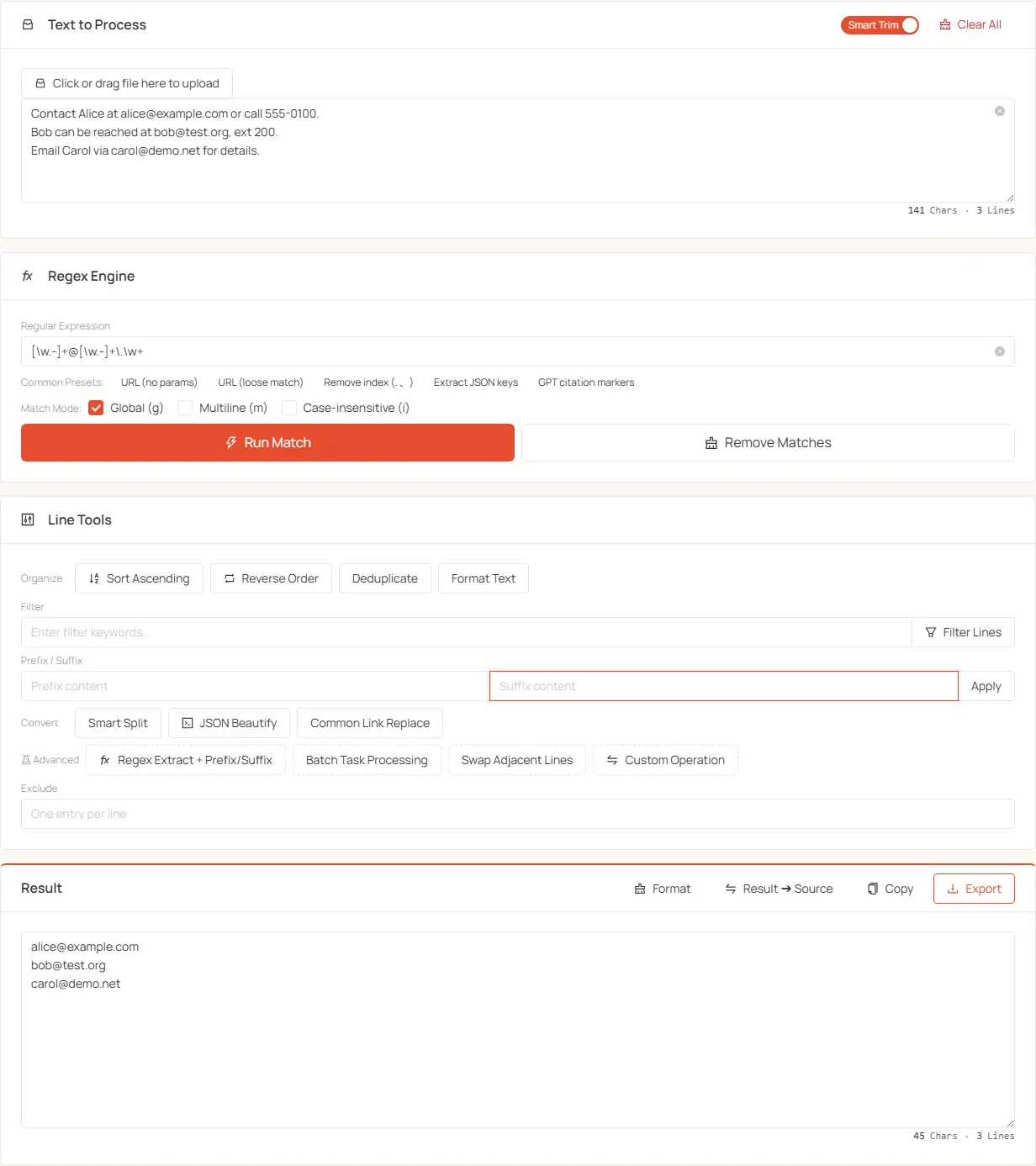
Multi-Function Text Processor gathers the text cleaning, extraction and formatting you do most often onto one page. The point isn't a wall of separate buttons — it's an operation catalog plus a step chain: every click appends a step, the chain runs top to bottom, and each step's output is the next step's input, recomputed as you go.
What it's for
- Pull specific content out: URLs, JSON keys, fields matching a pattern
- Strip the noise: ad lines, quote residue, HTML tags, blank lines, duplicate lines
- Rescue text copied from a terminal: remove the leading bar (
▎) and hard wraps from Claude Code / terminal output and get paragraphs back - Batch formatting: prefix/suffix every line into Markdown lists, CSV, SQL
IN (...) - Normalize case: UPPERCASE / lowercase / Title case / Sentence case
- Reorder data: sort ascending or descending, reverse, swap adjacent lines
- Collapse lines into one: join a column with any separator for pasting into a sheet or query
- Multi-step jobs: filter, then regex, then affixes — click them in order and the chain runs the whole thing
Layout
Two columns. Left column, top to bottom:
- Source panel — input, upload, the Smart trim switch, Clear all
- Result panel — read-only output, with the chain's step chips just above it
- PRESET — Select a preset, Save as preset, Update preset, Delete preset
- LINES (Line by line: sort · delete · dedupe · merge · affix) — Sort / Duplicates / Delete / Merge / Add prefix/suffix
- CASE (Letter case) — the four case buttons
Right rail:
- REGEX (Regex engine) — regex field, Presets chips, Match mode, Replace, Run match / Remove matches / Extract links with metrics, Pair extract
- FORMAT (Convert) — Smart split, Format text, Tidy CLI text, JSON beautify, Weibo link converter
Below 960px it collapses to a single column. The high-frequency line and case operations sit nearest the result; the more specialized regex and conversion work lives in the rail so it can't push the result off screen.
The Source panel
- Paste: drop text straight into the Source box (placeholder "Or type/paste text here")
- Upload: the "Click or drag file here to upload" control in the panel header accepts TXT, MD, JSON, CSV and other text files; the loaded name shows as a chip you can remove on its own
- Smart trim / Raw mode: the header switch. On (default) most operations first trim each line's surrounding whitespace and skip blank lines; off it reads Raw mode and keeps the original structure
- Clear all: clears the input and uploaded file, and clears the step chain too
- The footer shows live "characters · lines" counts
Past roughly 1,000,000 characters the input box turns read-only with an explanation, while processing and export still work on the full content.
The step chain
The chain is the backbone — understand it and you never have to memorize button order:
- A step is added by clicking its operation. At that moment the console fields' current values are snapshotted into the step; editing the fields afterwards does not silently rewrite steps you already added.
- Execution order is click order, top to bottom. Evaluation starts from the source text and each step's output feeds the next, so five clicks aren't five manual runs.
- Async steps are awaited in sequence: Smart split and the Weibo link converter take time, and the chain waits for them before continuing.
- Source text is never modified: every operation reads the source and writes to the result.
- The chain is visible as a row of chips above the result —
{count} steps appliedon the left, Clear steps on the right. Each chip readsoperation · parameter summary, e.g.Delete · ad,promo,Add prefix/suffix · 1000----. - Clicking a chip opens its parameter popover, and the edit applies to that step alone; the
×on the chip is "remove this step". - There is no drag-to-reorder. To change the order, remove the step and click again in the order you want — or use Result ➔ Source to restart from the current output.
- A step that fails validation never enters the chain: clicking "Delete these lines" with an empty keyword field, or with an invalid/empty regex, only shows a warning.
- The chain persists in localStorage under
text-toolbox-chainand survives a reload. On restore, unrecognized operations are dropped and missing parameters fall back to factory defaults.
The chain is re-editable: tune a step's parameters, delete a step, add one. Reach for Result ➔ Source only when the current output should become the new input for a different run — it writes the result back into Source and clears the steps.
PRESET — presets
A preset is a saved step chain including each step's own parameters.
- Select a preset: every dropdown entry shows its step sequence on a second line (longer chains fold to
… +N) - Save as preset: enabled when the chain isn't empty; type a Preset name in the dialog
- Update preset / Delete preset: only for presets you saved yourself
- Loading a preset replaces the current chain rather than appending
- If your chain no longer matches the loaded preset, the dropdown reads "Modified (was: name)" as a reminder that you haven't saved it back
- Three built-ins ship with the page and cannot be edited or deleted:
- Extract links, reversed — Run match (loose URL) › Reverse order › Merge into one line (separator
,) - Extract URLs, dedupe, sort — Run match (strict URL) › Deduplicate › Sort ascending
- HuggingFace to ModelScope — Replace:
https://huggingface.co→https://modelscope.cn/models
- Extract links, reversed — Run match (loose URL) › Reverse order › Merge into one line (separator
- Your own presets and the active selection live in localStorage keys
text-toolbox-presetsandtext-toolbox-activePresetId. Presets can't be imported or exported — on another browser you rebuild the chain
Built-in presets are read-only so someone else's chain can't quietly drift in your hands. Want a variant? Load it, then save under a new name instead of overwriting.
LINES — line by line
The band header names what's inside: sort · delete · dedupe · merge · affix. Each row puts parameters on the left and the verb on the right, so a row reads as "with this condition → do this".
Sort
- Sort ascending / Sort descending: Unicode string order. The button label shows the direction the next click will apply, so it flips as you click
- Reverse order: flip the line order
- Swap adjacent lines: exchange lines in pairs. Blank lines are dropped first (the remaining count must be even, otherwise it reports an error), then a blank line is re-inserted between each pair. Useful when a metric sits on the line above its link and you plan to follow with "Extract links with metrics"
Delete
One condition field feeds one button: Delete · [match mode] · [content] → Delete these lines.
- Match mode (segmented control):
- Contains: delete a line if any keyword appears in it (substring)
- Whole line: delete only exact line matches (ignoring surrounding whitespace)
- Content to delete: separate several conditions with commas or line breaks (e.g.
ad,promo,group id); stored locally - Delete these lines: removes the hits, keeps the rest, writes to the Result panel, leaves Source alone
Duplicates
- Deduplicate keeps the first of each identical line and preserves blank lines
- It does not read the Delete row's keyword field — hence its own row with no input
Merge
- Merge into one line joins all lines into one
- Separator (same row): what to join with; leave it empty for direct concatenation, and
\t,\n,\s,\\escapes are supported - Example:
,turns a column intoA, B, C;\tgives a tab-separated line you can paste into one Excel row
Add prefix/suffix
- Prefix content: prepended to every line; factory default is
1000----(and the field can be cleared) - Suffix content: appended to every line; factory default is empty
- The button on this row is labelled Apply — "Add prefix/suffix" is the row label
- Example: prefix
-, empty suffix → plain text becomes a Markdown list - Example: prefix
', suffix',→ a string list becomes a SQLIN (...)clause
CASE — letter case
One operation, four quick buttons, applied line by line without touching blank lines or indentation:
- UPPERCASE / lowercase
- Title case: capitalize each word
- Sentence case: capitalize the first letter of each sentence, lowercase the rest
REGEX — regex engine
Controls top to bottom:
- Regex field (placeholder "Enter regular expression..."): any JavaScript regex; the factory value matches strict URLs
- Presets: four chips that fill the field and set the flags each pattern needs
- URL (no params) — plain
https://links, no trailing punctuation - URL (loose match) — also handles parentheses, semicolons and friends
- Remove index (. 、) — leading
1.,2、,3) - Extract JSON keys — every key name, in multiline mode
- URL (no params) — plain
- Match mode: global (g) / multiline (m) / case-insensitive (i); only
gis on by default - Replace: a "Replace with…" field plus the Replace button. Replacement text is a literal — no
$1group references - Run match: lists every hit on its own line
- Remove matches: deletes hits, keeps everything else, collapses runs of blank lines to two
- Extract links with metrics: groups by seven Chinese metric words (点赞 / 转发 / 评论 / 播放 / 差 / 曝光 / 阅读) and outputs
link,valueper line — so it only works on text containing those Chinese words - Pair extract: the Extract & pair button with "Pairing regex" and "Template" fields. The anchor is the shared regex field above (there is no separate anchor input any more): it takes the first match per line, the pairing regex then captures outside the anchor on the same line (falling back to the next line), and output follows the template where
$0is the anchor and$1the captured pair. When every paired value is numeric, a total is appended in the result
FORMAT — convert
- Smart split: reflows long text into paragraphs, with Chinese paragraphs / English paragraphs on the adjacent segmented control (English uses the
compromiselibrary for sentence boundaries; Chinese follows paragraph rules) - Format text: removes blank lines, and trims each line's ends according to the Smart trim switch
- Tidy CLI text: purpose-built for text copied out of Claude Code / terminals — strips the leading quote bar (
▎ ▌ │) and indentation and rejoins hard-wrapped lines (Chinese joins directly, English gets a space), keeping list items and code blocks line by line. It is the only operation that depends on blank lines, so if an earlier step already dropped them the click warns you on the spot ("previous step dropped blank lines") and the step is skipped - JSON beautify: lenient parsing (unquoted keys, single quotes, comments) plus 2-space indentation
- Weibo link converter: turns mobile Weibo (
m.weibo.cn) links into PCweibo.comlinks and appends the blogger's profile URL. Links carrying only a uid resolve locally; detail pages need a network lookup for uid/bid, and entries that fail to resolve are labelled in the output text with the reason (no uid, uid/bid not found, network failure, unrecognized link)
Resolving Weibo detail pages sends requests, so it is slow and the chain waits for it. Offline or behind a blocked network this step fails while the rest of the chain still works. Smart split is local — it is async because it has to scan sentence boundaries, not because it calls out.
The Result panel
- Titled Result, permanently read-only (a lock plus "Read-only mode" explains it). Change the source or a step rather than trying to edit output in place
- With an empty chain, wide screens show a placeholder: "Run an action below — the result appears here"
- Three actions, left to right: Result ➔ Source (write output back and clear the steps), Copy, Export (downloads
text-processed.txt) - The footer shows the same "characters · lines" counts
Working tips
- Plan the chain backwards from the goal: "clean then affix" is Delete → Deduplicate → Add prefix/suffix, clicked once each in that order
- Save a chain you use often as a preset; the three built-ins are ready to run
- Test on a small sample first and read each chip's parameter summary to confirm it matches your intent
- Can't write the regex? Give an AI the requirement, a sample input and the expected output
- Prefer chaining over repeated "Result ➔ Source" round-trips — the latter clears your steps
Everything runs in your browser and nothing is uploaded (the Weibo link converter is the one step that makes network requests), so sensitive text is safe to process here.