

Translation API Guide
The tool integrates both classic translation APIs and LLM endpoints, so you can pick whichever fits your text type, budget, and privacy needs. The exact rosters and counts are in the two sections below (generated from the app's own provider catalog, so they stay in sync).
Which API should I pick?
For detailed comparisons and how to get API keys, keep reading ↓
Classic Translation APIs
Notes:
- DeepL can't be called directly from the browser — the tool routes through a built-in proxy by default. If you have your own proxy, fill it in the API URL field.
- Qwen-MT is Alibaba Cloud's translation-specialized model. See Qwen-MT essentials below.
- TranslateGemma is Google's open-source translation-specialized Gemma model. You'll need to run it locally with LM Studio / llama.cpp / koboldcpp (not Ollama — see below) — see Local Model Setup.
- MiLMMT (shipped as the MiLMMT-46 weights) is Xiaomi's open-source translation model (also Gemma3-derived) — fewer languages, but it covers Cantonese. Also runs locally; see MiLMMT.
- GTX API (Free) / Edge API (Free) are both zero-config free machine translation that back each other up — if one can't connect, switch to the other. See Free machine translation essentials below.
For more reliable service, apply for a commercial API key — see the API application guide.
Large Language Models (LLMs)
27 LLM endpoints are supported, in two groups:
- Direct vendors (16): DeepSeek, OpenAI, Claude, Gemini, Qwen, Kimi (Moonshot), Doubao (Volcengine), Xiaomi MiMo, Zhipu GLM, MiniMax, StepFun (阶跃星辰), Baidu ERNIE (Qianfan), Mistral, xAI (Grok), Cohere, YandexGPT (AI Studio)
- Aggregators & self-hosted (11): OpenRouter, OpenCode Zen, OpenCode Go, TokenHub (Tencent), Groq, Cerebras, SiliconFlow, Atlas Cloud, Nvidia NIM, Azure OpenAI, plus Custom (OpenAI-compatible)
The Custom (OpenAI-compatible) entry at the end is the catch-all: any OpenAI-protocol address goes there, with quick-pick URLs for local runtimes and third-party gateways listed right above the field (see Local Model Setup).
LLMs work best for:
- Literature and technical documentation that needs deeper understanding
- Multilingual content where consistent terminology matters
- Custom prompts to control translation style
Key parameters:
- Model: pick from the dropdown or type your own. Each dropdown row shows the friendly name above the real SKU, and the provider's default model carries a
defaulttag; a SKU too new to be listed can simply be typed in. For Azure OpenAI, enter the deployment name — the tool speaks the v1 GA API: put your resource root in the URL field and the tool appends the fixed/openai/v1suffix, so there is noapiVersionfield to fill anymore. - Temperature: defaults to 0.7. Try 0.2 for technical content, 0.9 for marketing or creative paraphrasing.
- Five providers have no temperature control: OpenAI (the whole GPT-5.x / 6.x line is reasoning-only and returns 400 on any non-default value), Claude (adaptive/extended thinking on the listed SKUs rejects temperature), Gemini (3.x officially recommends keeping the default 1.0 — lowering it can trigger looping output), Kimi (Moonshot) (k2.x / k3 lock it), and Azure OpenAI. For these the parameter is never sent and the input is hidden, so the server default applies — steer the tone with the system prompt or thinking effort instead.
- Thinking mode: lets the AI think before translating — higher quality, slower and pricier. Supported models get an extra dropdown below Model, and the choice is stored per model, so switching models preserves each one's setting. Four shapes:
- Two levels (Off / On): DeepSeek (ON always uses the top tier — the API's middle tiers add nothing for translation), Doubao, Zhipu GLM, Xiaomi MiMo, MiniMax M3, Baidu ERNIE 5.0 Thinking, Mistral (Medium 3.5 / Small), Cohere Command A Reasoning, SiliconFlow — these APIs accept on/off but not an effort value
- Four levels (Off / Low / Medium / High): every other thinking-capable provider, including Claude, OpenAI GPT-5.x / 6.x, Gemini, Qwen3, Kimi (Moonshot), xAI Grok, GPT-OSS on Groq and Cerebras, Azure OpenAI, and the thinking-tagged models on OpenRouter
- The lowest level reads Min, not Off: when the vendor ships no "off" value at all, the bottom entry is labelled Min — the model still reasons and still bills, so calling it Off would be a lie. That applies to Gemini 3.x, xAI Grok 4.5 / 4.6, GPT-OSS on Groq and Cerebras, Kimi K3 / K2.6, plus the single SKU Claude Fable 5 (officially Always on — an explicit disable returns 400; its siblings Opus 5 / Sonnet 5 / Haiku 4.5 can be turned off)
- Three-state (Off / On / Auto): when you type an unlisted custom model on a thinking-capable provider. Auto omits the thinking param to follow the model's built-in default — a fallback for strict providers that error on a non-thinking SKU; defaults to Off
- No thinking control at all: StepFun, YandexGPT, OpenCode Zen, TokenHub, Atlas Cloud, Nvidia NIM, Custom (OpenAI-compatible). Aggregators front many upstreams whose "can thinking be disabled?" answer differs per model, so a blanket disable would hit models that don't accept one — they all follow the upstream model's server-side default instead
Provider-Specific Notes
- TokenHub (Tencent): Tencent Hunyuan has moved to TokenHub, which resells DeepSeek / GLM / Kimi / MiniMax / MiMo alongside its own hy3. ⚠ An API key alone is not enough — each model must first be enabled on the console's "Online Inference" page (free trial or pay-as-you-go), otherwise every call returns 400
401006("service ID does not exist"). The official endpoint only sends CORS headers on successful responses and answers every preflight with 405, so direct browser calls always fail and API relay is ON by default. - OpenCode Zen: an aggregator whose
(free)-suffixed SKUs cost nothing to use — an account with billing details on file is required, but there is no prepayment. The upstream sends no CORS headers and answers preflights with a 404 page, so API relay is ON by default here too. - OpenCode Go: same host, same account, same API key as OpenCode Zen — only three things differ: the request path (
/zen/go/v1vs/zen/v1), the SKUs on offer, and the billing model. Go is a $10/month subscription allowance (the vendor converts it per model per month: 5 hours ≈ 20%, a week ≈ 50%, a month ≈ 100%), while Zen is a prepaid balance — so never describe Go as "top up and go". One workspace can have exactly one Go subscriber. The upstream sends no CORS headers either, so API relay is ON by default. - Cerebras: included for speed, not for its catalogue (both public models are also available on Groq / Nvidia / SiliconFlow). Cerebras advertises ~3000 tokens/s on gpt-oss-120b, which is very noticeable for the short, frequent requests line-by-line translation produces; it also grants 1M free tokens per day.
- YandexGPT (AI Studio): needs a Folder ID in addition to the API key (grab it from the folders page in the Yandex AI Studio console). For the model field, enter a SKU name (e.g.
yandexgpt-5.1; open-weight SKUs like Qwen3, DeepSeek, and GPT-OSS are also offered) or paste a fullgpt://<folder_id>/<model>/latestURI. Yandex's API sends no CORS headers, so API relay is ON by default (the switch stays user-controllable, and you can point the URL at your own relay instead). - Removed from the service list: GitHub Models (retired by GitHub on 2026-07-30), Perplexity Sonar (chat/completions shut down ahead of schedule), and the old Tencent Hunyuan endpoint (migrated to TokenHub). LiteLLM is no longer a separate entry — it is now a URL quick-pick under Custom (OpenAI-compatible); see Self-hosted gateways and third-party inference platforms.
Regional Endpoint Switcher
Many providers run separate endpoints for Mainland China, International, and US regions. The official endpoints appear as quick-pick chips above the URL field — click to switch:
URL Auto-Completion
Claude and every OpenAI-protocol provider (including Custom, TranslateGemma, MiLMMT, Qwen / Qwen-MT, Nvidia, and YandexGPT) complete the URL to its full path the moment focus leaves the field; for the rest, a custom URL is normalized automatically before each request is sent. Paste http://host:port or http://host:port/v1 and the tool fills in the rest — the classic "missing /v1/chat/completions → connection failure" mistake can't happen.
Free machine translation essentials
The tool ships three zero-config free machine-translation services — GTX (Free), Edge (Free), and DeepLX (Free). None need an API key; they call the official endpoints directly from your browser and your text never touches this tool's servers. They take different routes, so they back each other up: if one can't connect, just switch to another in the dropdown — no key required. GTX is the default.
GTX gateway is switchable
GTX defaults to translate-pa.googleapis.com (the gateway behind Google's web-translate widget — CORS-correct, good availability). Quick-switch chips sit above the URL field:
- translate-pa (default): recommended, works in most network environments
- Legacy gtx: the old
translate.googleapis.com/translate_aendpoint. Google has tightened anti-abuse on it (many IPs get redirected to a captcha page, which the browser reports as CORS), but the block is IP-reputation-based and some regions/networks still pass — kept as a fallback - Self-hosted mirror: paste your own mirror URL (e.g. a Cloudflare Worker); the tool auto-detects the protocol from the address shape
Rate limits and automatic slowdown
The shared free endpoints are rate-limited per user. GTX now translates in batched chunks — many lines packed into ~5000-character blocks, one request per block — so request volume drops sharply versus line-by-line, and everyday use rarely triggers throttling. Huge bursts can still hit limits; the tool handles it automatically:
- When throttled it pauses all requests to the service and resumes on its own shortly after, showing "Rate limited — pausing briefly, will retry automatically"
- Translation slows down but keeps going; in most cases no action is needed
- If the failure panel keeps showing rate-limit messages: wait a few minutes and hit "Retry failed lines" (the cache skips completed lines), switch to the Edge (Free) / DeepLX (Free) backups, or move long batch jobs to a keyed service like DeepL / Qwen-MT / DeepSeek
Can't connect, or seeing CORS errors in the console? First switch the gateway or try Edge (Free) — that fixes most cases in one step. Still failing? Check your network environment (mainland China blocking, corporate network interception, browser extensions) — see FAQ → GTX Free cannot connect for the checklist.
Qwen-MT Essentials
Qwen-MT is a machine translation service (not a general LLM). It has no system-prompt concept and works purely with source/target language codes — so the Prompt settings don't apply.
Picking a Model
The Model field offers a dropdown, and you can also type a SKU yourself:
The older
qwen-mt-turbohas been deprecated by Alibaba Cloud and is no longer listed.
Domain Hint
The domains field tells the model what industry the text is from, so terminology lands closer to the field. Important: write a short English description, not a keyword list. Alibaba's official example:
Leave empty if you don't need it.
Native Glossary Channel
Qwen-MT is one of the few MT services with native glossary support: with the Glossary enabled, matched terms are sent through the official translation_options.terms parameter and applied by the model itself — more reliable than prompt injection.
Unsupported Languages
Qwen-MT covers ~92 languages; a number of low-resource ones aren't covered and the UI auto-blocks them with a clear message (the in-app blocklist is authoritative): e.g. Kyrgyz (ky), Turkmen (tk), Tajik (tg), Mongolian (mn), Malayalam (ml), Uyghur (ug), Amharic (am), and dozens more.
API relay & Built-in Proxy
Some providers' official endpoints block direct browser calls (CORS). The tool offers two proxy channels; text is never stored on our servers.
API relay (user-controlled)
Every LLM provider except Gemini, Nvidia NIM, Azure OpenAI — 24 in total: DeepSeek, OpenAI, Claude, Qwen, Kimi (Moonshot), Doubao (Volcengine), Xiaomi MiMo, Zhipu GLM, MiniMax, StepFun (阶跃星辰), Baidu ERNIE (Qianfan), Mistral, xAI (Grok), Cohere, YandexGPT (AI Studio), OpenRouter, OpenCode Zen, OpenCode Go, TokenHub (Tencent), Groq, Cerebras, SiliconFlow, Atlas Cloud, Custom (OpenAI-compatible) — offers an API relay toggle in settings. When enabled, requests are forwarded through the built-in Cloudflare worker (request body and auth headers only):
YandexGPT (AI Studio), OpenCode Zen, OpenCode Go, TokenHub (Tencent) default to ON because upstream sends no CORS headers or fails preflight. The rest start on direct and can be switched on when you hit a CORS wall.
- The exceptions named above have no such switch: Custom and Azure OpenAI point at an address you supply, so there is no fixed upstream for a relay to target; Nvidia NIM goes through the built-in proxy described in the next section; and Gemini puts the model name in the URL path, which a pass-through relay can't forward
- Self-hosted relay: prefer your own relay? Put its address in the URL field. The precedence is fixed: custom URL > relay switch > official direct — with a URL filled in, the relay switch is grayed out with a note ("clear the URL to re-enable")
- The relay passes through the server's
Retry-Afterheader, so rate-limit auto-slowdown is exactly as precise as direct calls
Built-in Proxy (no switch)
DeepL and Nvidia NIM route through a separate built-in proxy by default. If you specify a custom API URL in settings, the proxy is bypassed and requests go directly to your URL.
Local Model Setup
Want to run models locally for privacy? The tool works with any OpenAI-compatible local server. For decent translation quality with a generic LLM, use qwen3-14b or larger (32B-class works even better); on limited VRAM, switch to the translation-specialized TranslateGemma or MiLMMT — solid quality from 4B up (run those two on LM Studio / llama.cpp / koboldcpp, not Ollama — see below).
In mainland China, download models from ModelScope — far faster than direct Hugging Face access or LM Studio's built-in downloader, and the official TranslateGemma repos are mirrored there.
Local servers usually have one parallel slot (llama.cpp defaults to --parallel 1; LM Studio's Max Concurrent is single-digit), while this tool defaults to 10 concurrent lines. The surplus requests queue on the server, and each request's timeout clock starts the moment it is sent — on slow hardware the ones at the back of the queue expire before their turn ever comes.
Lower "Call Parameters → Concurrent lines" to 2-4 (or match your server's slot count) before raising "Advanced Settings → Timeout". Reducing concurrency rarely makes things slower: the server was computing them one at a time anyway.
Default Endpoints
These appear as quick-pick chips next to the URL field. Selecting one also surfaces that runtime's official docs link below the field — provider-level docs can't tell you how to get the server itself running.
These two pre-render their prompt and POST it to /v1/completions; the whole design rests on the server applying no template of its own. Ollama still applies the Modelfile template on that endpoint — three lines of its own source (checked against ollama/main, 2026-08-22):
api/types.go:// Raw set to true means that no formatting will be applied to the prompt.openai/openai.go:FromCompleteRequestbuildsapi.GenerateRequestwithout settingRaw→ defaults tofalseserver/routes.go:if !req.Raw { tmpl := m.Template … }
So the carefully pre-rendered prompt gets wrapped a second time — in whatever template the imported GGUF happened to carry, which the client cannot control. Quality degrades for no visible reason and nothing errors. That is why Ollama is absent from these two services' chips; use LM Studio / llama.cpp / koboldcpp instead.
(Custom (OpenAI-compatible) uses /v1/chat/completions, where applying the template is exactly right — unaffected.)
koboldcpp is a single-file llama.cpp wrapper (no install, one .exe, built-in web UI). On its default port 5001 it serves both the KoboldAI API and an OpenAI-compatible one.
Self-hosted gateways and third-party inference platforms
Besides the four local runtimes, Custom (OpenAI-compatible) offers five non-local quick-pick URLs — click to fill, no typing:
LiteLLM used to be its own service entry; it has been folded into Custom, because like Together and Fireworks it is simply "an OpenAI-protocol address" and doesn't need a dedicated slot. Everything about using it still holds:
- The URL is the credential, and the API key is optional (skip it for a bare local proxy; fill it in if your proxy has a master / virtual key)
- Model can stay empty: when started with
litellm --model X(the official quick-start) or with acompletion_modelserver default, an empty model field follows the server's default; for multi-model config.yaml deployments, enter the model alias
TranslateGemma
Google's translation-specialized Gemma model, trained specifically for translation quality. Quick notes:
- Pick "TranslateGemma" directly from the service list — don't go through "Custom (OpenAI-compatible)" with
translategemma-4b-itas the model name. The two take entirely different code paths: the dedicated TranslateGemma service makes line-by-line calls tailored to the Gemma translation model's I/O format, while Custom uses the generic LLM pipeline with batching and context markers — which causes dropped lines and slower runs on small (under 14B) models. - The default URL points to LM Studio on port 1234; one click switches to llama.cpp / koboldcpp. Do not use Ollama — see the warning above
- API key is optional: leave it empty for a plain local server; if your deployment requires auth (LM Studio's "require API key", vLLM's
--api-key, or a reverse proxy in front), fill it in and requests carry anAuthorization: Bearerheader - Recommended models: for an ordinary home PC, start with
translategemma-4b-it— compact, fast, and clean output.translategemma-12b-it/27b-itgive higher quality but demand far more VRAM and compute - The model name can be left empty: an empty field sends no model, so the server uses whatever it currently has loaded. Model ids are decided by the runtime (LM Studio, Ollama and llama.cpp each report their own, quantization suffixes included) — on a 404 "model not found", clearing the field is usually faster than guessing the name
- 12B's "multiple options" noise: this is the model's own behavior, not an integration issue. In testing, 12B often returns several candidate translations for the same sentence with no fixed format — the tool can't filter them out, so the output is full of noise. On home hardware, stick with 4B; if you want to use 12B, verify the output is clean on a short sample before running a full batch
- Prompt settings don't apply: like Qwen-MT, it's a machine-translation service — the prompt is built into the call format; system/user prompts only affect LLM providers
- Source language must be explicit — auto-detect isn't supported
- Limited language coverage: 53 mainstream languages are selectable in the tool (Google's WMT24++ benchmark scope). The other 69 — including Cantonese (yue), Bhojpuri (bho), Wolof (wo), Aragonese (an), Guarani (gn), Kurdish (ckb/kmr) — are blocked by the UI. Use DeepL / Google / Azure / Qwen-MT for broader coverage
MiLMMT
Xiaomi's open-source translation model MiLMMT-46 (also Gemma3-derived; 1B / 4B / 12B, with community GGUF quants). Usage mirrors TranslateGemma, with one trap that's specific to it:
- Pick "MiLMMT" directly from the service list — this matters even more here than for TranslateGemma. Xiaomi state on the model's discussion page that post-training largely stripped away its instruction-following: tags and instructions are treated as noise, not commands. Going through "Custom (OpenAI-compatible)" splices your system prompt straight into the model's input and wrecks the output. The dedicated MiLMMT service calls it line by line in the exact format from the official model card, with no prompt mixed in
- The default URL points to LM Studio on port 1234; one click switches to llama.cpp / koboldcpp. Do not use Ollama — see the warning above
- API key is optional: leave it empty for a plain local server; fill it in if your deployment requires auth
- Recommended models: the default
MiLMMT-46-4B-v1.0suits a consumer GPU; 1B runs on CPU alone, 12B gives higher quality - The model name must match what your runtime has loaded — when in doubt, leave it empty: an empty field sends no model, so the server uses whatever is currently loaded. Faster than guessing the name after a 404
- Prompt settings, glossary and context translation all have no effect — same reason as above: the model can't take instructions. Use an LLM provider or Qwen-MT when you need terminology control
- Source language must be explicit — the prompt hard-codes the source language name; the model has no auto-detect mode
- 47 languages selectable (Xiaomi brand it as 46 language families): Cantonese (yue) is supported (TranslateGemma is not), along with Kazakh / Uzbek / Azerbaijani / Lao / Burmese / Khmer / Malay; but Ukrainian (uk), Serbian (sr) and the Baltic three are not, and Indic coverage stops at Bengali / Hindi / Tamil / Urdu. Unsupported languages are blocked by the UI. 39 languages are shared with TranslateGemma
Xiaomi say instruction-following and glossary support are planned for a future release. Until then, treat it as a pure MT engine.
Solving CORS Issues
If a local model can't be reached, the two usual culprits:
Step 1: Disable ad/privacy extensions, then refresh and retry.
Step 2: Enable CORS on the local server.
Ollama
Run this once in PowerShell (Win + X to open Terminal) to enable it permanently:
*allows all origins. For tighter security, use a specific domain likehttp://192.168.2.20:3000.
Restart the Ollama service for the change to take effect. To enable temporarily, set the variable when starting:
LM Studio
- Open the "Developer" icon in the left menu
- Go to the local server settings page, click "Settings" at the top
- Check the "Enable CORS" box
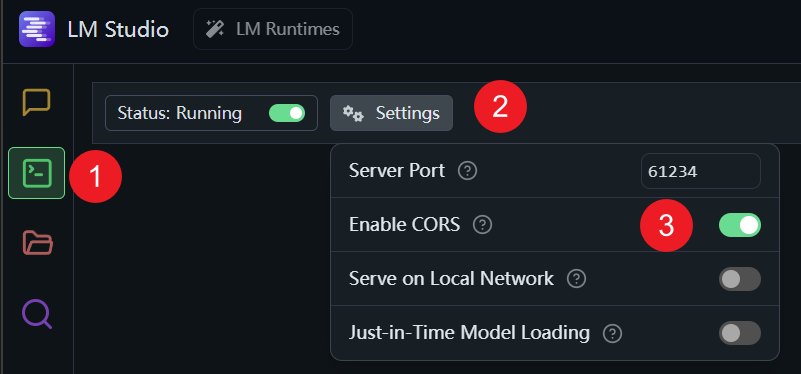
That's it — local models should work now. If you're still stuck, check for port conflicts and look at the browser console for the actual error. (Special thanks to mrfragger for the configuration tips.)
Language code reference
The tool translates between 120+ languages, grouped by region. When configuring multiple languages at once, use the codes below (e.g. en, zh, ja, ko):