

head:
-
- meta
- property: og:title content: Text Toolbox - Regex, Filter, Sort, Batch Format on One Page | Tools By AI description: One-stop text-processing toolbox. Regex match, filter, dedup, sort, batch prefix/suffix, JSON beautify, smart paragraph split — all on a single page. Runs locally in your browser, no data uploaded. faq:
- q: What text operations does this tool support? a: Regex extract/remove, keyword filtering, line-level dedup, sort (asc/desc), reverse, batch prefix/suffix, JSON beautify, smart paragraph split, adjacent-line swap, plus a few preset combos targeted at web/social-media data. All on one page, stackable.
- q: What if I don't know how to write regex? a: The Regex Engine card ships with 5 common presets — URL (strict), URL (loose), Remove Index, Extract JSON Key, GPT cite markers. One click fills in the regex and the matching flags. For more complex patterns, describe what you need to ChatGPT/Claude and paste the generated regex back to iterate.
- q: What does the "Smart Trim" toggle actually do? a: When enabled (default), most action buttons (match, sort, dedup, prefix/suffix, …) first trim per-line whitespace and skip empty lines. When off, the original line structure is preserved.
- q: What's the difference between "Remove Matches" and "Run Match"? a: "Run Match" extracts every hit and lists them out. "Remove Matches" does the opposite — it deletes hits from the source and keeps everything else, also collapsing 3+ consecutive newlines down to 2.
- q: Can I export the processed text?
a: Yes — one-click copy, save as
text-processed.txt, or click "Result → Source" to feed the current result back into the input for further processing. Runs entirely in your browser — million-character files never leave your machine. appUrl: https://tools.newzone.top/en/text-toolbox appName: Text Toolbox
Text Toolbox
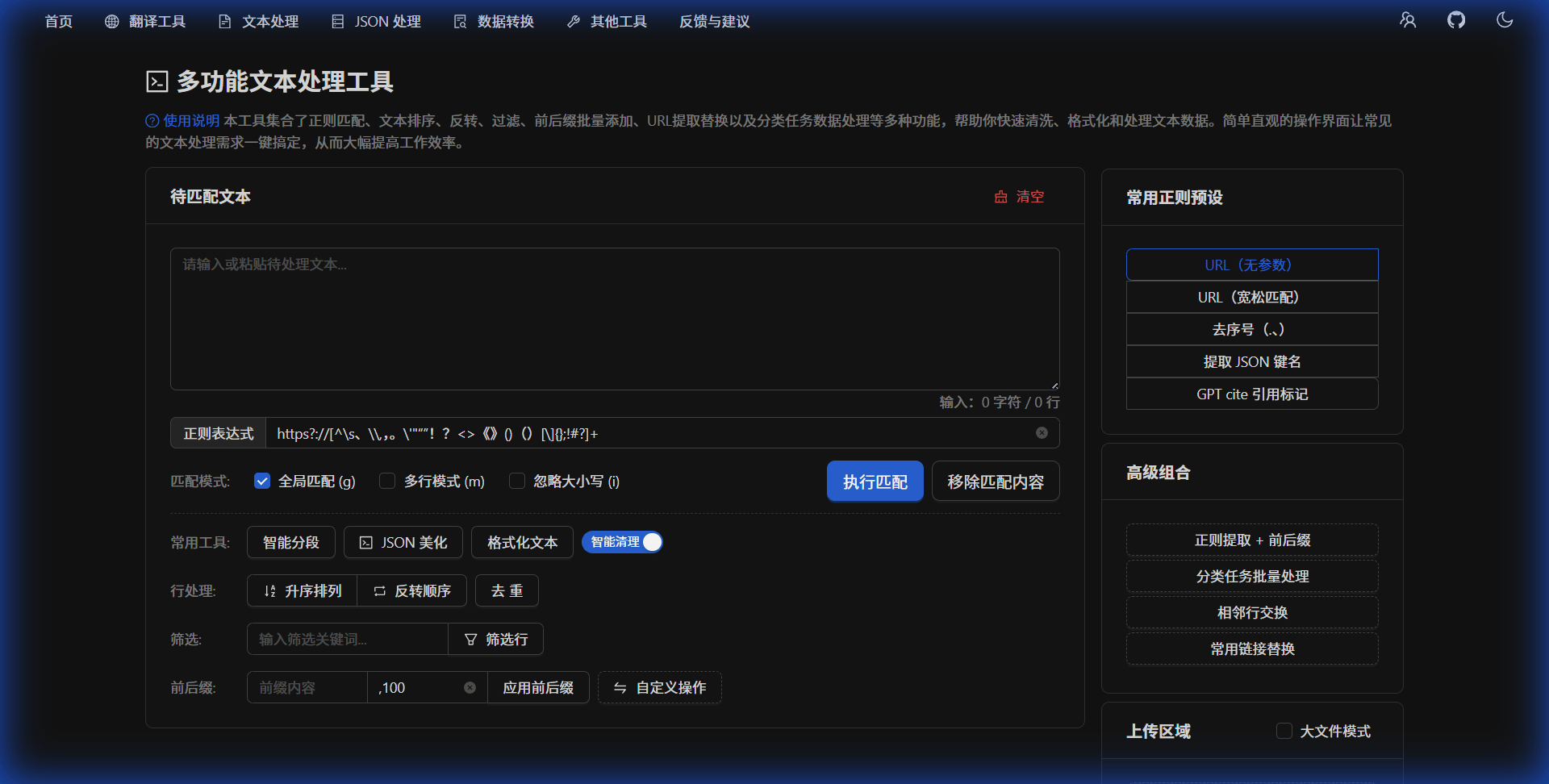
Text Toolbox is an integrated browser text utility that consolidates the most common cleanup, extraction, and formatting operations into a single page. Messy text from a webpage, lists of fields, or content that needs bulk reordering — all handled in a few clicks.
What problems does it solve?
- Extract specific content: pull URLs, JSON keys, pattern-matching fields from a large body of text
- Clean up noise: strip ads, GPT citation markers, HTML tags, blank lines
- Batch formatting: add prefixes/suffixes to each line — Markdown lists, CSV, SQL
INclauses - Sort & organize: asc/desc sort, reverse, dedup (with an exclusion list)
- Complex pipelines: filter → regex → affix multi-step cleanups
Page layout
Top to bottom, three cards:
- Source Text — input area + file upload + the "Smart Trim" toggle (bottom right)
- Regex Engine — regex input + 5 presets + 3 flags + two action buttons
- Line Tools — line-level operations grouped by purpose
When done, a Result card appears at the bottom with copy / export / format / move-to-source actions.
Source Text card
- Paste: directly into the textarea
- Upload: drag-and-drop or click; TXT, MD, JSON, CSV and other rich-text formats supported
- Smart Trim toggle (default on): when on, almost every processing button first trims per-line whitespace and drops empty lines; when off, the original line structure is preserved
Regex Engine card
- Regex input: any JavaScript regex pattern
- 5 common presets (CheckableTags): one click fills in the regex and sets the appropriate flags
- URL (strict): matches plain
https://URLs without trailing punctuation - URL (loose): catches URLs containing brackets, semicolons, more punctuation cases
- Remove Index: strips leading "1. ", "2、", "3) " line numbers
- Extract JSON Key: pulls every key name out of a JSON blob (multiline)
- GPT cite markers: cleans
[1],(cite...)residue from GPT/Claude output
- URL (strict): matches plain
- 3 flags: global (g) / multiline (m) / case-insensitive (i)
- Two buttons:
- Run Match: extract every match and list them; toast shows the count
- Remove Matches: delete matches from the source; also collapses 3+ newlines to 2
Line Tools card (grouped by purpose)
Organize
- Sort Ascending / Descending: alphabetical (Unicode order); click toggles direction
- Reverse: invert line order
- Dedup: drop fully duplicate lines (use with the "Exclude" textarea below to keep certain lines even when duplicated)
- Format: drop blank lines + smart trim (or not, depending on the toggle)
Filter
- Type comma-separated keywords, e.g.
ad,promo,channel - Click "Filter Lines": delete every line containing any of the keywords; result lands in the Result card
Prefix / Suffix
- Prefix input: prepended to every line (empty by default)
- Suffix input: appended to every line (defaults to
,100, edit freely) - Example: prefix
-, empty suffix → convert plain text into a Markdown list - Example: prefix
', suffix',→ convert a list of strings into a SQLIN (...)clause
Convert
- Smart Split: uses
compromiseEnglish NLP for sentence boundaries + Chinese paragraph rules - JSON Beautify: lenient parse (handles unquoted keys, single quotes, comments) + 2-space indent
- Common Link Replace: replace every
https://huggingface.cowithhttps://modelscope.cn/models— useful for switching HuggingFace links to a China-accessible mirror
Advanced (same row of buttons)
- Regex Extract + Affix: extract via regex then batch-apply prefix/suffix in one step
- Batch Task Extract: a URL → number pairing pipeline — finds each line's URL, then scans for numbers attached to keywords like 点赞 / 转发 / 评论 / 播放 / 差 / 曝光 / 阅读 (Chinese social-media metrics) and outputs CSV grouped by metric
- Adjacent Swap: swap line pairs end-to-end (input must have an even line count)
- Custom Operation: extract all URLs via the "URL (loose)" preset + reverse order + join with commas (handy for reverse-lookup URL lists)
Exclude (paired with Dedup)
- The multi-line textarea at the bottom of the Line Tools card
- Used by Dedup: lines listed here are kept even when duplicated
- Example: exclude
Home\nAboutto preserve those headings across repeated occurrences
Result card
When something has been produced, the Result card surfaces:
- Copy: one-click clipboard copy
- Export: download as
text-processed.txt - Format: clean up extra blank lines in the result
- Result → Source: pipe the result back into the input for the next step (great for multi-stage pipelines)
Tips
Getting started
- Try the presets first — Regex Engine card → click a tag
- Test on a small slice before processing critical data
- Stacked operations: filter → extract → affix solves most cleanups in three clicks
Power moves
- Keep Smart Trim on for almost every workflow
- Chain multi-step pipelines via "Result → Source"
- When regex stumps you, describe the problem + sample input + expected output to ChatGPT/Claude
Runs entirely in your browser — no data is uploaded — safe for sensitive material.